


7 Essential Keyboard Accessories Australia 2026
7th Oct 2026
Table of Contents
- Why the Right Keyboard Accessories Matter in Australia
- 1. Keyboard Stand for Beginners: Stability Before Anything Else
- 2. Keyboard Sustain Pedal: The Accessory That Changes How You Play
- 3. Headphones for Digital Piano: Practice Without Disturbing Anyone
- 4. Keyboard Gig Bag: Protection When You Carry Your Gear
- 5. Benches and Seating: Play Longer Without Back Pain
- 6. Music Stands and Lighting: See Your Sheet Music Clearly
- 7. Power Supplies and Cables: Keep Everything Connected
- Which Keyboard Accessories to Buy First
- Frequently Asked Questions
Last Updated: October 7, 2026
Why the Right Keyboard Accessories Matter in Australia
Take a digital piano home and it arrives as a bare instrument: no stand, no pedal, no way to sit at it properly.
Keyboard accessories are the supporting items that make a digital piano playable, portable and comfortable: stands, pedals, headphones, gig bags, seating, music stands and power gear. None of them make a sound on their own.
Below, we rank seven essentials in buying order and flag the compatibility traps that catch first-time buyers.
1. Keyboard Stand for Beginners: Stability Before Anything Else
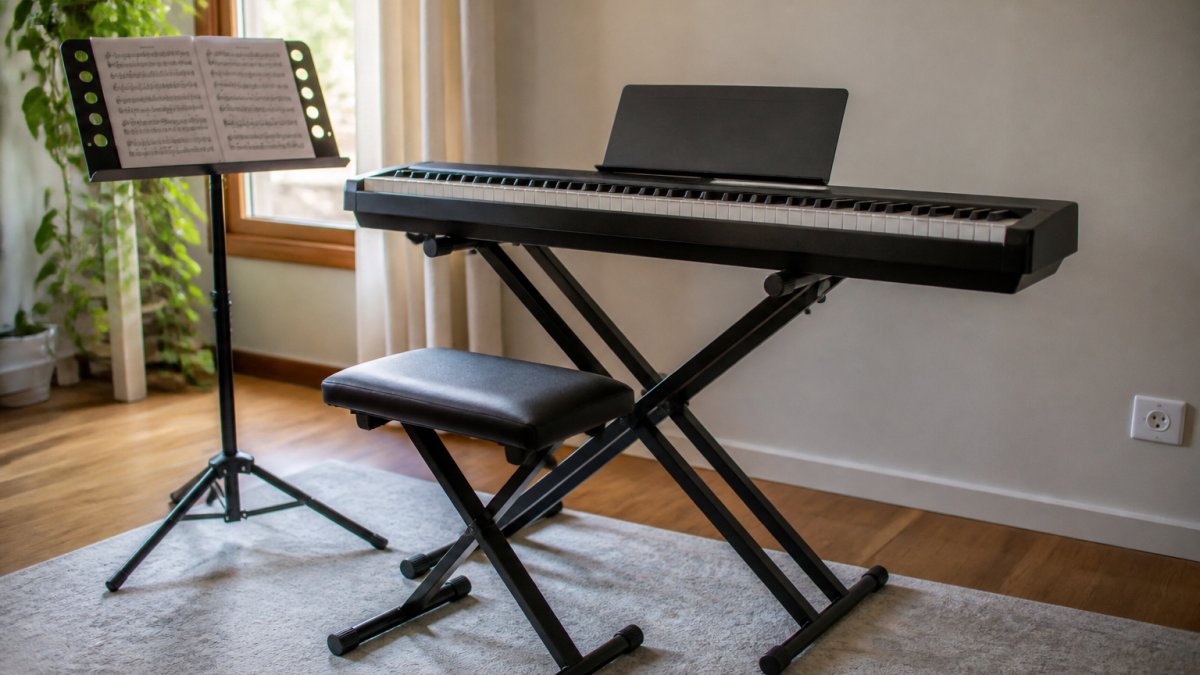
The best keyboard stand for beginners is a double-braced X-frame model with a locking height mechanism and rubberised contact points. A wobbly stand kills your technique before it develops, because every keystroke transfers movement into the frame instead of the keys.
Check the stand is rated comfortably above your instrument's weight, and look for a crossbar or stabilising arm on heavier 88-key models. If you play seated and standing at different times, an adjustable stand saves you from hunching.
X-frame vs double-braced stands: what to check
An X-frame stand folds into a single scissor shape and sets up in seconds. The single-braced version is lighter and cheaper, but the legs flex under heavy playing.
Check three things before buying:
- The height range, measured to the top of the arms, not the floor
- Whether the locking pin engages positively at each height setting
- The width of the arms against your keyboard's underside footprint
2. Keyboard Sustain Pedal: The Accessory That Changes How You Play
A keyboard sustain pedal is the single accessory that changes your playing most, because it lets notes ring on after you lift your fingers. With one, pieces written for piano finally sound like piano.
Two types exist: the simple foot switch bundled with many entry keyboards, and the piano-style pedal with a weighted lever. The weighted version gives you half-pedalling control, the difference between a mechanical on-off and something that responds to your foot.
Compatibility checks before you buy
Not every pedal works with every keyboard. Check these before ordering:
- Polarity: some keyboards expect a normally-open switch, others normally-closed. A mismatched pedal sustains when you are not pressing it. Many pedals have a polarity switch to solve this.
- Connector type: quarter-inch jack, or a proprietary multi-pin socket on some slim models
- Half-pedal support: only works if both the pedal and the keyboard support it
3. Headphones for Digital Piano: Practice Without Disturbing Anyone
The right headphones for digital piano are closed-back, over-ear models with a flat response and a comfortable clamp force for long sessions.
Avoid bass-heavy consumer headphones: they smear the midrange where piano lives, so you struggle to hear your own dynamics.
If you share the house, this is the accessory that buys you practice time. In-ear monitors and hearing protection become worth considering later, but they are not a first purchase.
4. Keyboard Gig Bag: Protection When You Carry Your Gear
A keyboard gig bag is the difference between an instrument that survives the car boot and one that arrives with cracked keys and a scratched display. Buy one sized to your exact keyboard dimensions, not "close enough".
How to size a gig bag correctly
Measure your keyboard's width, depth and height, then add roughly 20mm of clearance on each dimension so the instrument slides in without forcing the zip. Too tight stresses the corners and zip; too loose lets the keyboard slide and strike the walls in transit. For an 88-key model, check the internal length against the published figure rather than assuming "88-key" means one universal size, because cabinet depth varies between slim stage pianos and console-style home models.
What to look for:
- Padded walls at least 10mm thick on all six faces
- Reinforced corners, since that is where drops land
- Internal straps to stop the instrument sliding inside the bag
Gig bag, hard case or dust cover?
A padded gig bag suits local travel, rehearsals and the occasional gig where you load the keyboard yourself. A hard case adds rigid protection for touring or air travel, but it costs and weighs considerably more, so it is rarely the right first purchase for a home player. For a keyboard that never leaves the house, a fitted dust cover does the same job for far less, dust and direct sunlight are the two quiet killers of digital pianos.
Australian consumer considerations
If a bag fails at a seam or zip within a short period of normal use, Australian Consumer Law gives you a remedy against the retailer regardless of any manufacturer warranty period, because goods must be of acceptable quality and fit for purpose. Keep your receipt and photograph the fault before returning it. When buying online, confirm the returns policy for incorrect sizing, since a bag that does not fit your model is a common and avoidable return.
5. Benches and Seating: Play Longer Without Back Pain
An adjustable bench is the accessory most players skip and later regret. A dining chair puts you at the wrong height, which forces your wrists to break upward and your shoulders to lift.
Set the bench so your forearms sit roughly level with the keys, then adjust the stand to match.
What most guides miss is that seating affects pedal control too.
6. Music Stands and Lighting: See Your Sheet Music Clearly
A music stand and a clip-on light solve a problem you will not notice until winter, when the light in a Robina living room fades by late afternoon and you are squinting at sheet music. Good lighting reduces eye strain and lets you read ahead instead of staring at the page.
Choosing between a built-in rest and a separate stand
Many digital pianos include a music rest, but it is often shallow and fixed at one angle. If you read from thick bound books or a tablet, a separate stand gives you a deeper lip, a wider platform and an adjustable tilt. Look for:
- A solid lip or page retainers, so pages do not flip when you turn quickly
- An adjustable angle, so the top of the page sits roughly perpendicular to your line of sight
- A stable base or clamp, so the stand does not creep when you lean on it
For tablet players, a stand with a rubberised lip and firm hinge prevents the screen from sliding or catching glare. If you read from paper, buy a sturdy stand rather than the wire folding type, which flutters every time you turn a page.
Lighting that actually helps you read
A clip-on LED light with a USB power source is the simplest answer for most home setups. Two details matter more than brightness:
- Colour temperature: a neutral white around 4000K to 5000K keeps notation legible without the harsh blue cast of some cool-white lamps or the yellow tint of warm globes.
- Direction and diffusion: aim the light across the page from above and slightly to one side, and choose a diffused panel rather than a bare LED cluster, which creates hot spots and glare on glossy paper or a tablet screen.
Position the light so it does not reflect into your eyes or wash out the display. In a room with a single ceiling fixture, a small dedicated lamp on the music stand beats turning up the room light, because it puts the light where you are actually looking.
Local buying notes for Robina and the Gold Coast
Gold Coast winters are mild but the light drops early, and many homes have living areas facing away from the afternoon sun. If you set up near a window, a clip-on light still helps on overcast days and after dark. When buying in person in Robina, take your own music or tablet and test the stand angle and light spread before you commit, because glare and page-flip behaviour are hard to judge from a product photo.
7. Power Supplies and Cables: Keep Everything Connected
The correct power supply is the least exciting accessory and the one most likely to cause real damage if you get it wrong. Digital pianos are sensitive to voltage and polarity, and a mismatched adapter can fry the board.
Match three specifications exactly: voltage, current rating (equal or higher than the original) and connector polarity. Keep the original adapter's label, photograph it, and take the photo shopping with you.
A short list of supporting gear worth having:
- A surge-protected power board, since Queensland storm season is unforgiving
- A spare quarter-inch instrument cable if you run to an amp or interface
- Cable ties or a velcro strap to stop the tangle behind the stand
Which Keyboard Accessories to Buy First
For most players the order is simple: stand, sustain pedal, then headphones. Those three turn a bare instrument into something you can actually practise on.
| Priority | Accessory | Why It Matters | Buy When |
|---|---|---|---|
| 1 | Keyboard stand | Stability and correct playing height | Immediately |
| 2 | Sustain pedal | Notes ring properly; core technique | Immediately |
| 3 | Headphones | Silent practice at any hour | Immediately |
| 4 | Bench or stool | Prevents back and wrist strain | Within the first month |
| 5 | Gig bag or dust cover | Protects against knocks, dust, sun | Before the first trip out |
| 6 | Music stand and light | Readable sheet music in low light | Before winter |
| 7 | Power supply and cables | Safe, reliable connection | As needed |
If you are buying in Robina or anywhere on the Gold Coast, visiting a shop in person lets you test stand height and bench comfort before committing, which is hard to judge from a product photo.
Frequently Asked Questions
What accessories do you need for a keyboard?
At minimum, you need a stand for stability, a sustain pedal for expressive playing, and headphones for quiet practice. Beyond those three, a gig bag protects your keyboard when travelling, a bench improves your posture, a music stand light helps you read sheet music, and a power supply keeps everything running. If you play live, add a volume pedal and spare cables. Start with the essentials and build from there based on how and where you play.
Do keyboard players need a sustain pedal?
Yes, a sustain pedal is one of the most important keyboard accessories you can buy. Without it, notes stop the moment you lift your fingers, which makes piano pieces sound choppy. Most digital pianos include a basic pedal, but upgrading to a proper keyboard sustain pedal gives you better control over half-pedalling and dynamics. Check that the pedal is compatible with your keyboard model before buying, as connection types vary between brands.
Which headphones are suitable for a digital keyboard?
Look for closed-back over-ear headphones with a 6.35mm adapter, since most digital pianos use a quarter-inch jack. Closed-back designs block external noise so you hear only the keyboard. Avoid Bluetooth headphones for practice because the latency makes timing difficult. Wired studio headphones work well. If you practise for long sessions, prioritise comfort and a detachable cable so a snag does not damage the connection.
How do I protect a keyboard when transporting it?
A padded keyboard gig bag is the simplest protection for local travel. Measure your keyboard's width, depth, and height before buying, and choose a bag with at least 10mm of foam padding and reinforced corners. For longer trips or flights, a hard case offers better impact resistance but weighs more. Always remove the stand and pedals before packing, and keep cables in a separate pocket so they do not scratch the keys or screen.
Getting the accessories right is the difference between a keyboard that sits in the corner and one you play every day. Muzic Man carries a wide range of branded musical instruments and supplies, with a physical shop on the Gold Coast and delivery across Australia, so you can confirm what fits your instrument before you buy. Browse the range online or visit us in Robina to get set up properly.