


Karaoke Machine Review: Best Picks for Home Use
6th Oct 2026
Table of Contents
- Karaoke Machine Comparison: Top Systems for Home Use
- Ikarao Break X1: The All-in-One Powerhouse
- JBL PartyBox 710: Best for Sound Quality and Large Parties
- Ikarao Shell S1 and Tonor K20: Compact and Beginner-Friendly Options
- Choosing a Karaoke Machine With Screen: What to Know
- Karaoke Software for PC: When to Skip the Hardware
- Karaoke Party Tips for Australian Homes and Rentals
- Conclusion
- Frequently Asked Questions
Last Updated: October 6, 2026
Karaoke Machine Comparison: Top Systems for Home Use
A karaoke machine is an all-in-one audio system that plays backing tracks, amplifies vocals through a microphone, and displays lyrics on a screen so anyone can sing along at home.
This guide from Muzic Man compares the systems we get asked about most at our Gold Coast shop, from the all-in-one Ikarao Break X1 to software-only setups for people who already own a decent speaker.
Here is the comparison table first, so you can scan before you read:
| System | Screen | Output | Best For | Standout Feature |
|---|---|---|---|---|
| Ikarao Break X1 | 33.8cm rotatable | 460W | Dedicated home singers | All-in-one design, 10-hour battery |
| JBL PartyBox 710 | None | 800W RMS | Large parties | Dual mic inputs, light show |
| Ikarao Shell S1 | 25.7cm | Compact | Small gatherings | Portable, wireless mics |
| Tonor K20 | Integrated | Modest | Beginners | Simple setup, Bluetooth |
| KaraFun (software) | Your device | Your speakers | Existing sound systems | 60,000+ track library |
Ikarao Break X1: The All-in-One Powerhouse
The Ikarao Break X1 is the closest thing to a complete karaoke machine with screen in a single box.
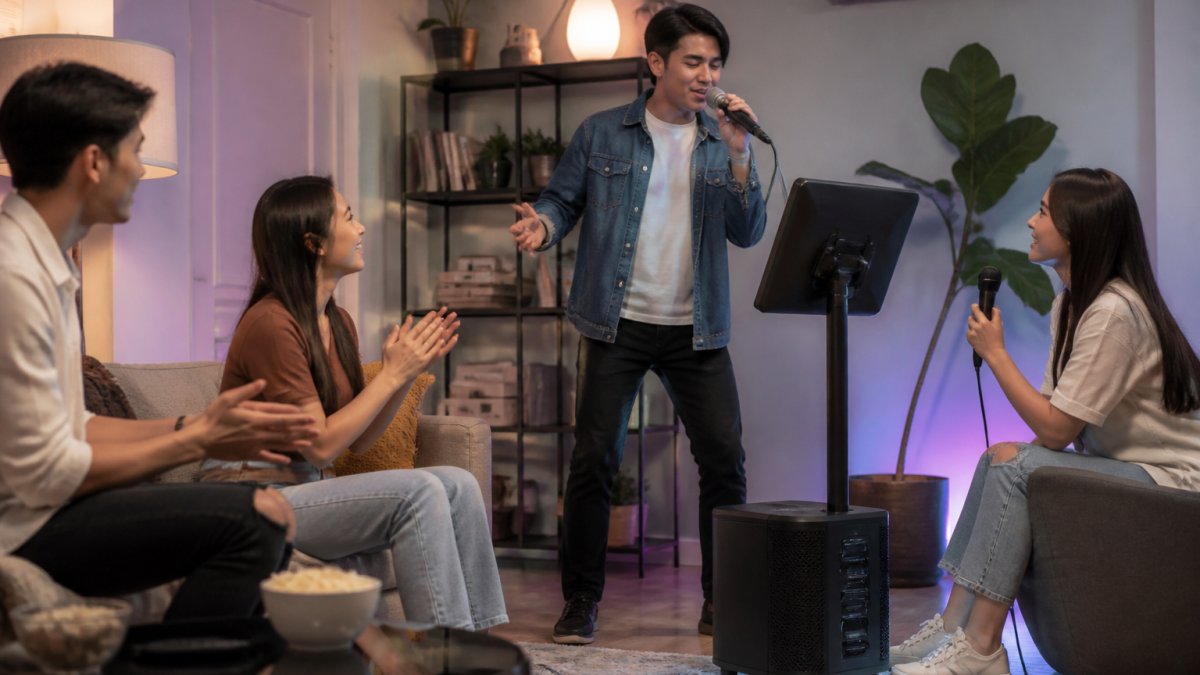
Power output sits at 460W, which is enough to fill a lounge room or a covered patio without straining.
The trade-off is cost. This is a premium unit, and if you only sing a few times a year, you may not need the rotatable display or the battery.
JBL PartyBox 710: Best for Sound Quality and Large Parties
If sound quality matters more than lyrics on a built-in display, the JBL PartyBox 710 is the pick. It pushes 800W RMS through dual woofers, delivering the bass response and audio fidelity that smaller portable units cannot match.
Two microphone inputs with dedicated gain control let you run a duet setup or mix a host and a singer.
What it lacks is a screen. You will need a phone, tablet, or TV to display lyrics, which is a real consideration if you want a plug-and-play setup.
Ikarao Shell S1 and Tonor K20: Compact and Beginner-Friendly Options
Not everyone needs 800W and a rotatable display. The Ikarao Shell S1 and Tonor K20 target smaller rooms and first-time buyers, and both do it well.
The Shell S1 packs a 25.7cm smart display into a compact frame, with built-in vocal effects and wireless microphone connectivity. It suits small to medium home gatherings, and setup takes minutes.
Where they fall short is sound reinforcement. Neither will fill a large outdoor space, and the Shell S1's screen is noticeably smaller than the Break X1's.
Choosing a Karaoke Machine With Screen: What to Know
A karaoke machine with screen removes the biggest friction point in home karaoke: finding something to display lyrics on. Built-in displays range from small integrated panels to large rotatable touchscreens, and the difference matters more than most buyers expect. Most top-ranking guides stop at "bigger is better", the detail below is what actually decides whether a screen works in your lounge room.
Screen size and viewing distance
As a working rule, a singer needs roughly 2.5cm of screen height for every 30cm of viewing distance to read lyrics comfortably. That puts a 25.7cm panel at its limit around two metres, and a 33.8cm rotatable screen comfortably usable from three to four metres. If your lounge layout puts the singer more than three metres from the screen, anything under 25.7cm will have you leaning in by the second chorus.
Resolution and brightness
Resolution matters less than brightness for karaoke, because lyrics are large text on a mostly plain background. What does matter is nits, a screen rated below 300 nits becomes hard to read in a bright, sunlit Queensland living room, especially with a window behind the singer. If you plan to run the machine on a covered patio during the day, look for a panel rated 400 nits or higher, or plan to shade the screen.
Rotation and tilt
A rotatable display lets you angle the screen toward the singer rather than the couch, which keeps everyone facing the same way and stops the awkward "turn the TV around" shuffle mid-song. Fixed screens work fine if the machine sits on a dedicated stand facing the singer; rotatable screens earn their keep in rooms where the machine doubles as a party speaker and gets moved around.
Touchscreen vs. non-touch
Touchscreens let you queue songs, adjust key, and skip tracks without picking up a phone. Non-touch screens rely on a remote or a paired device. For a household that hosts regularly, touch is the feature people notice most; for occasional use, a remote is fine and usually cheaper.
The software behind the screen
A screen is only as good as the track library behind it. Check three things before buying:
- Library size and licensing. Streaming libraries change; offline libraries don't. If your internet is patchy, an offline-capable library matters more than a bigger online catalogue.
- Key and tempo control. Being able to shift a song down a semitone or two turns an un-singable track into a comfortable one. This is the single most underrated feature on any karaoke machine.
- Lyric sync quality. Poorly timed lyrics ruin a song faster than bad audio. Look for systems with word-by-word highlighting rather than line-by-line, which is standard on better units.
When to skip the built-in screen
If you already own a good television, skipping the built-in screen and using an HDMI output or casting from a phone or tablet is a legitimate way to save money, and it gives you a much larger display for group singing. The trade-off is setup time and cable clutter, plus the fact that you now depend on your TV being free when guests arrive.
Karaoke Software for PC: When to Skip the Hardware
Karaoke software for PC makes sense when you already own a capable speaker and microphones. Instead of buying another all-in-one unit, you run the tracks through your existing audio setup.
KaraFun is the benchmark here. It offers access to over 60,000 studio-quality tracks, works across Windows, Mac, iOS and Android, and includes an offline mode for venues without reliable internet.
The catch is the setup. You need speakers, microphones, and a device to run the software, plus a subscription rather than a one-off purchase.
Karaoke Party Tips for Australian Homes and Rentals
Karaoke party tips matter more in Australia than most guides admit, because our homes are built differently. Open-plan living, hard floors, and high ceilings reflect sound, which makes a modest system sound louder and harsher than it would in a carpeted room. The two gaps every major retailer guide skips are room acoustics and the buy-vs-rent decision, both covered below.
Acoustic considerations for home spaces
Sound reflections are the single biggest reason a good karaoke machine sounds bad in a real lounge room. Three practical adjustments fix most of it:
- Soften the room. Rugs, curtains, and soft furniture absorb reflections. A bare tiled lounge is the worst-case acoustic environment for vocal amplification; a carpeted room with a sofa and curtains is close to ideal.
- Break up parallel walls. Bookcases, plants, and wall art disrupt the standing waves that cause boominess in square rooms. You don't need acoustic panels, furniture does most of the work.
- Position the speaker at ear height. Placing a portable unit on the floor muddies the sound and boosts bass unevenly. A low table or a dedicated stand makes vocals clearer at lower volumes, which matters in apartments and townhouses.
- Aim the speaker away from hard corners. Corner placement amplifies bass and makes vocals harder to hear. Pull the unit at least 30cm out from any wall.
Buy vs. rent: the one-off event question
Most guides assume you're buying. If you're hosting a single birthday, engagement party, or work function, hiring a karaoke system for the weekend is often the better call, you get a higher-spec unit than you'd buy, no storage problem afterwards, and no ongoing maintenance.
A simple rule: if you can name three occasions in the next twelve months when you'd use it, buy. If you can only name one, hire.
Noise, neighbours, and rental rules
In a rental or apartment, keep the speaker off shared walls and finish before 10pm. Most Queensland strata and tenancy rules treat excessive noise as a breach, so check your lease or body corporate by-laws before hosting, some buildings have stricter cut-offs than the state default. If you're in a townhouse with a shared wall, pointing the speaker into the room rather than at the wall makes a noticeable difference to what the neighbours hear.
Maintenance and longevity
A karaoke machine that gets used monthly will last years with basic care; one that gets put away damp and dusty won't.
- Microphones. Wipe the grille and handle after each session with a dry microfibre cloth. For shared mics, a fresh foam windscreen per guest is the cheapest hygiene upgrade you can make.
- Battery health. For portable units, avoid leaving them plugged in at 100% for weeks. Store at roughly half charge if the machine won't be used for a month or more, and charge to full the day before a party.
- Cables and inputs. Coil cables loosely rather than wrapping them tight around the unit, tight coiling is the most common cause of intermittent mic dropouts.
- Software updates. Check for firmware updates every few months; lyric sync and Bluetooth stability fixes are the usual payload.
Conclusion
Getting the right setup for your space is the hard part, and it is where most online listings leave you guessing. Muzic Man stocks many branded musical instruments and supplies, ships Australia-wide, and gives you the option to visit our Gold Coast shop and hear the gear before you commit. Browse our online store or drop in to compare systems side by side and find the one that fits your room.
Frequently Asked Questions
What is the best karaoke machine for home use?
The best karaoke machine for home use depends on your space and budget. All-in-one systems like the Ikarao Break X1 suit dedicated home setups with a 33.8cm rotatable touchscreen and 460W sound. For smaller gatherings, the Ikarao Shell S1 or Tonor K20 offer portability and integrated screens. If you already own speakers, a software subscription like KaraFun paired with your existing gear gives you access to over 60,000 tracks without buying new hardware.
What features should I look for in a karaoke machine?
Focus on microphone inputs (wireless or wired), sound pressure level and speaker output for your room size, and whether you want a built-in HD screen or will use an external display. Check Bluetooth connectivity, USB playback, and auxiliary input options for flexibility. If you plan to move it between rooms or outdoors, a rechargeable battery and portable unit design matter. Echo control and pitch correction also improve vocal performance for casual singers.
Do I need a professional karaoke system or a portable machine?
A portable machine suits most home users. Systems like the Tonor K20 are easy to set up, move between rooms, and store away. Professional systems make sense if you host regular events for large groups or need higher sound reinforcement. For a typical Australian living room or backyard gathering, a portable unit with 200W to 500W output provides enough vocal amplification without overwhelming the space.
Are karaoke machines compatible with smart TVs?
Many karaoke machines connect to smart TVs via HDMI output or Bluetooth, letting you display lyrics on a larger screen. All-in-one systems with a built-in display skip this step entirely. If your machine lacks a screen, you can stream lyrics from a karaoke software app on your phone or PC and cast to your TV. Check that your machine has the right output (HDMI, AUX, or Bluetooth) before buying.